
We provide IT support services for companies in Madrid that need responsive helpdesk, on-site assistance, preventive maintenance and clear pricing guidance. The service adapts to users, devices, security requirements and SLA expectations so support cost stays predictable.
What "IT support services" include for Madrid companies (scope & deliverables)
The term "IT support services" covers a broad range of operational activities, and the scope varies significantly between providers. For Madrid companies evaluating options, the distinction between a basic helpdesk contract and a fully managed IT support model is substantial — both in what gets covered and in the business outcomes you can expect.
At its core, IT support for businesses encompasses user-facing helpdesk and incident resolution, endpoint management (laptops, desktops, mobile devices), Microsoft 365 administration, network and server troubleshooting, and proactive monitoring to catch problems before they cause downtime. Beyond reactive ticket handling, mature managed IT support also includes preventative maintenance, patch management, documentation and runbooks, and a defined escalation structure.
Impulso Tecnológico delivers personalised managed IT support for Madrid-based organisations, combining remote and on-site assistance with proactive monitoring and preventative maintenance. Rather than waiting for users to report failures, the approach is built around identifying and resolving issues early — reducing the volume and severity of incidents over time.
| Service Component | Basic Helpdesk | Managed IT Support (MSP) |
|---|---|---|
| User incident resolution | Reactive only | Reactive + proactive monitoring |
| Endpoint management | On request | Continuous (patching, updates, health checks) |
| Microsoft 365 administration | Limited or excluded | Included (accounts, licences, security settings) |
| Network and infrastructure | Excluded or extra cost | Included within defined scope |
| Cybersecurity controls | Not included | Integrated (firewall, endpoint protection, backup) |
| Preventative maintenance | Not included | Scheduled and documented |
| Reporting and documentation | Minimal | Regular reports, runbooks, asset inventory |
| Pricing model | Per incident / hourly | Fixed monthly per device or per user |
Helpdesk, incidents, requests, problems and changes (ITIL-style delivery)
A structured IT support operation distinguishes between four distinct ticket types: incidents (something that has broken and needs restoring), service requests (planned actions such as account creation or software installation), problems (root-cause investigations into recurring incidents), and changes (controlled modifications to infrastructure or configuration). Without this distinction, support teams spend time firefighting the same issues repeatedly instead of eliminating root causes.
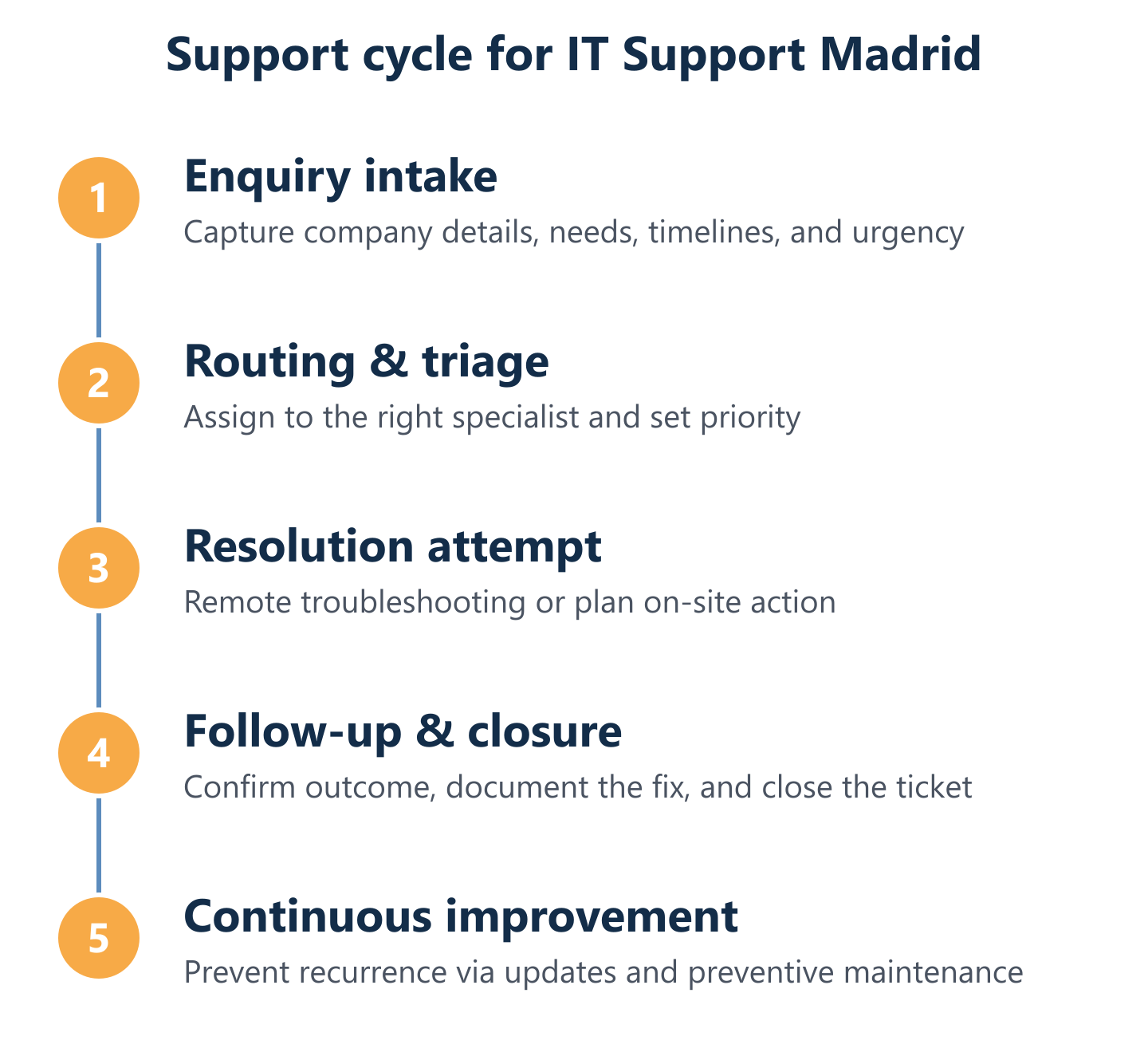
Impulso Tecnológico applies structured ticket workflows that categorise and prioritise each interaction correctly from the moment it is logged. This means incidents affecting business-critical systems are escalated immediately, while service requests are handled within agreed timeframes without disrupting higher-priority work. For Madrid companies managing 50 or more users, this structured delivery model reduces mean time to resolution and prevents incidents from stalling in queues.
Endpoint and Microsoft 365 support: devices, accounts, and productivity continuity
Endpoints — laptops, desktops, and mobile devices — are the primary point of failure for most business users. Effective IT support covers hardware troubleshooting, operating system issues, application errors, and connectivity problems, as well as the software deployment and configuration management that keeps devices in a known, secure state.
Microsoft 365 support adds another critical layer: account provisioning and deprovisioning, licence management, Exchange Online and Teams troubleshooting, SharePoint permissions, and security configuration (including multi-factor authentication and conditional access policies). Impulso Tecnológico manages Microsoft environments as part of its managed IT support scope, keeping productivity tools available and properly configured. For Madrid businesses running hybrid or remote workforces, this combination of endpoint and Microsoft 365 coverage is the foundation of operational continuity.
Many Madrid offices also run mixed environments: Windows and macOS laptops side by side, Microsoft 365 alongside Google Workspace, and meetings on Teams, Zoom or Google Meet. Support should treat each platform as a first-class environment, with consistent device provisioning at onboarding, account and licence administration in whichever suite you use, and access control that works across both, so no part of the team is left waiting for a third party.
Monitoring, patching and preventative maintenance to reduce recurring issues
Reactive support alone does not reduce incident frequency — it only shortens the time to resolution after something breaks. Proactive monitoring changes the equation: by continuously observing system health, network performance, disk capacity, and security events, a managed IT support provider can identify and remediate developing issues before they cause user impact.
Patch management is equally important. Unpatched operating systems and applications are among the most common vectors for security incidents. A structured patching schedule — tested and deployed in maintenance windows — keeps endpoints and servers current without disrupting business hours. Impulso Tecnológico combines monitoring, patching, and documented preventative maintenance tasks into its managed service model, with runbooks that standardise how common issues are handled. This documentation also reduces dependency on individual engineers and accelerates resolution times across the team.

Service levels (SLAs) and coverage options you can choose
Service level agreements are the contractual backbone of any managed IT support arrangement. For Madrid companies, the critical question is not just whether an SLA exists, but whether it is defined in terms that actually reflect business impact — and whether the provider has the operational capacity to meet it consistently.
When evaluating SLAs and coverage options, consider these five dimensions in sequence:
- Priority classification: Does the provider define severity levels (critical, high, medium, low) based on business impact — for example, a full office outage versus a single user's printer issue — rather than applying a flat response time to all tickets?
- Response and resolution targets: Are response time commitments (time to acknowledge) and resolution time targets (time to fix) stated separately, and are they realistic given the provider's team size and tooling?
- Coverage hours: What hours does the SLA cover? Impulso Tecnológico operates Monday to Friday, 09:00–18:00 CET — a model well suited to organisations whose critical operations fall within standard business hours. Confirm your own operational window before agreeing to any coverage model.
- Remote vs. on-site scope: Which issues can be resolved remotely, and what triggers an on-site visit? For Madrid companies with physical infrastructure, clear rules on on-site escalation prevent delays when remote access alone is insufficient.
- Reporting and measurement: How frequently does the provider share SLA performance data? Monthly reports with ticket volume, resolution times, and trend analysis allow you to hold the provider accountable and identify recurring problem areas before they escalate.
Impulso Tecnológico defines SLA targets in the accepted scope and supports clients through a centralised multidisciplinary team.
SLAs that matter: response, resolution, and priority definitions for business impact
Not all SLAs are equal. A contract that promises a four-hour response time for every ticket regardless of severity is less useful than one that defines distinct response and resolution targets by priority tier. A critical incident — such as a server failure affecting all users, or a security breach in progress — demands a response within minutes, not hours. A low-priority request, such as a new email alias, can reasonably wait until the next business day.
A well-structured SLA framework typically defines four priority levels: P1 (critical, full business impact), P2 (high, significant impact on key users or systems), P3 (medium, limited impact with a workaround available), and P4 (low, cosmetic or informational). Each level carries separate response and resolution targets. When reviewing a provider's SLA, ask specifically how these priorities are defined and who has authority to escalate a ticket from one level to the next.
Escalation paths and communication: how incidents move from L1 to specialists
A common failure mode in IT support is the stalled ticket: an incident that has been acknowledged but not progressed because the first-line analyst lacks the skills or access to resolve it, and no escalation has been triggered. Clear escalation paths prevent this. L1 support handles user-facing issues and standard service requests. L2 covers infrastructure, server, and network problems requiring deeper technical knowledge. L3 involves specialist engineers or vendor support for complex or critical issues.
Impulso Tecnológico's multidisciplinary team covers all three levels internally, which means escalation happens within the same organisation rather than being handed off to a third party with no context. For Madrid clients, this internal escalation model reduces resolution times significantly compared to providers who rely on external escalation chains. Communication protocols — including how and when clients are updated on open incidents — should be agreed during onboarding, not left to the provider's discretion.
Coverage model for Madrid: on-site support where required and remote support for speed
Remote support resolves most IT incidents faster than on-site visits — no travel time, immediate access to remote management tools, and the ability to work on multiple issues simultaneously. However, certain situations require physical presence: hardware replacement, network cabling, access control installation, or incidents where remote access itself is unavailable.
For Madrid companies, the practical coverage model combines remote-first resolution with a defined on-site response capability when needed. Impulso Tecnológico provides both, with on-site support available across Madrid and the surrounding area. This hybrid model is particularly valuable for organisations with multiple office locations or a mix of remote and office-based staff. When evaluating providers, confirm the on-site response time commitment, whether on-site visits are included in the monthly contract or billed separately, and how multi-site coordination is handled if your organisation operates across more than one location.
Who does the on-site work. In Madrid, visits are carried out by Impulso Tecnológico's own technical team. For offices elsewhere in Spain and in Portugal, on-site work is coordinated with the nearest local technician or partner, while the helpdesk and remote support stay with the same team. In practice, more than 70% of routine incidents are resolved remotely, and every intervention ends with a short report of what was found, what was done and what we recommend next.
How IT support is priced: hourly packages or a fixed monthly plan. The commercial model shapes the provider's incentives as much as your budget:
- Hourly packages: suit companies with low or unpredictable support volumes. They usually cover corrective work only, so if incidents recur every month they end up costing more than a plan.
- Fixed monthly plan: suits teams that depend on their systems every day. Remote helpdesk, monitoring, patching and preventive maintenance are included for the covered infrastructure, and on-site visits depend on the plan chosen. Because fewer incidents also lower the provider's own cost, the incentive is to prevent problems rather than bill for them.
The price itself depends on the number of users and devices, servers and critical applications, sites, coverage hours and SLA targets. That is why we give a closed proposal only after a prior study that defines the scope, rather than a figure up front.
The Madrid-ready security & compliance approach (and how onboarding works)
IT support and cybersecurity cannot operate as separate workstreams. Every endpoint managed, every user account provisioned, and every patch deployed is also a security action. For Madrid companies operating under GDPR and increasingly relevant frameworks such as NIS2, the managed IT support provider is effectively part of the organisation's security and compliance posture.
When assessing a provider's security and compliance readiness, look for these capabilities built into the standard service:
- Endpoint protection: Active deployment and management of endpoint security solutions (Impulso Tecnológico works with Sophos and Fortinet technologies) as part of the managed service, not as an optional add-on.
- Firewall and network security: Ongoing management of perimeter security, including firewall rule reviews and network segmentation where appropriate.
- Backup and disaster recovery: Structured backup policies with tested recovery procedures, using solutions such as Veeam, to ensure business continuity after an incident.
- Identity and access management: Microsoft 365 security configuration, multi-factor authentication enforcement, and controlled user lifecycle management.
- GDPR-aligned data handling: Support processes that respect data minimisation, access controls, and incident notification requirements.
- Compliance documentation: Maintained asset inventories, change logs, and incident records that support internal audits and regulatory reviews.
Impulso Tecnológico integrates these controls into its managed IT support model, so security is embedded in operations from day one rather than bolted on after an incident.
Security-by-operations: integrating cybersecurity services into managed IT support
The most effective cybersecurity posture for a Madrid company is one where security controls are part of everyday IT operations — not a separate annual assessment. This means endpoint protection is deployed and actively monitored on every managed device, firewall policies are reviewed when network changes occur, and security patches are applied within defined windows rather than left to accumulate.
Impulso Tecnológico integrates cybersecurity services directly into its managed IT support scope. Technologies from Sophos and Fortinet provide endpoint protection and network security, while Veeam-based backup and disaster recovery solutions ensure that even in the event of a ransomware attack or hardware failure, data can be restored within agreed recovery time objectives. This integrated approach means security incidents are detected and contained faster, and the support team already has the context and access needed to respond effectively.
Compliance and governance: keeping support processes aligned with requirements
For companies operating in Madrid, GDPR compliance is a baseline requirement, not a differentiator. Beyond GDPR, organisations in sectors such as finance, healthcare, and energy face additional regulatory obligations — including NIS2 for critical infrastructure operators and sector-specific standards that govern how IT systems are managed, monitored, and documented.
Managed IT support processes need to be designed with these requirements in mind. This means maintaining accurate asset inventories, logging all changes to systems, retaining incident records for audit purposes, and ensuring that access to sensitive data is controlled and reviewed regularly. Impulso Tecnológico builds these governance practices into its service delivery model, providing clients with the documentation and process discipline needed to demonstrate compliance during internal audits or regulatory reviews — without requiring the client to manage this overhead themselves. For further detail on how structured IT maintenance supports compliance, see our guidance on IT maintenance for businesses.
Onboarding plan: assessment, inventory, ITSM tooling, and a controlled go-live
A managed IT support engagement that starts without a structured onboarding process creates risk: the provider lacks the context to resolve incidents effectively, and the client organisation loses continuity during the transition. A well-designed onboarding plan covers four stages.
First, an initial assessment of the existing IT environment — infrastructure, endpoints, applications, and current pain points — establishes a baseline. Second, a full asset inventory documents every managed device, account, and system, creating the foundation for accurate monitoring and patch management. Third, ITSM tooling is configured: ticket workflows, escalation rules, notification settings, and integration with the client's communication channels. Fourth, a controlled go-live is planned with a parallel period where both the outgoing and incoming support models operate simultaneously, reducing the risk of gaps. Impulso Tecnológico follows this structured approach to ensure that monitoring, runbooks, and escalation paths are all in place before full handover.
Choosing the right IT support partner for your Madrid organisation comes down to four practical questions: Does the scope match your actual environment? Are the SLAs defined in terms of business impact, not just ticket response times? Is security integrated into day-to-day operations rather than treated as a separate engagement? And does the provider have a structured onboarding plan that reduces transition risk?
Impulso Tecnológico has more than 26 years of experience addressing these questions for organisations in Spain and through international remote support. If you want dependable IT support in Madrid, the next step is a straightforward assessment of your current environment and requirements — so the proposal you receive reflects your business reality, not a generic package. You may also find it useful to explore how we deliver IT technical support for businesses and our approach to proactive IT maintenance as complementary service models.